
Specialist advice in 3 days
Mater Queensland eConsultant offers a ‘Request for Advice’ (RFA) service to support GPs wanting access to specialist cardiology, dermatology (adult and paediatric), endocrinology, haematology, nephrology, neurology, obstetric medicine and respiratory and sleep medicine.
This is not a referral to Mater but is a request for timely clinical advice which may eliminate the need for a specialist face-to-face outpatient consultation.
The service uses the Consultmed digital platform and is asynchronous. GPs will receive feedback from the Mater Queensland eConsultant team within 3 business days.
Mater Queensland eConsultant is easily accessed via Consultmed. Instructions for set-up can be found below.
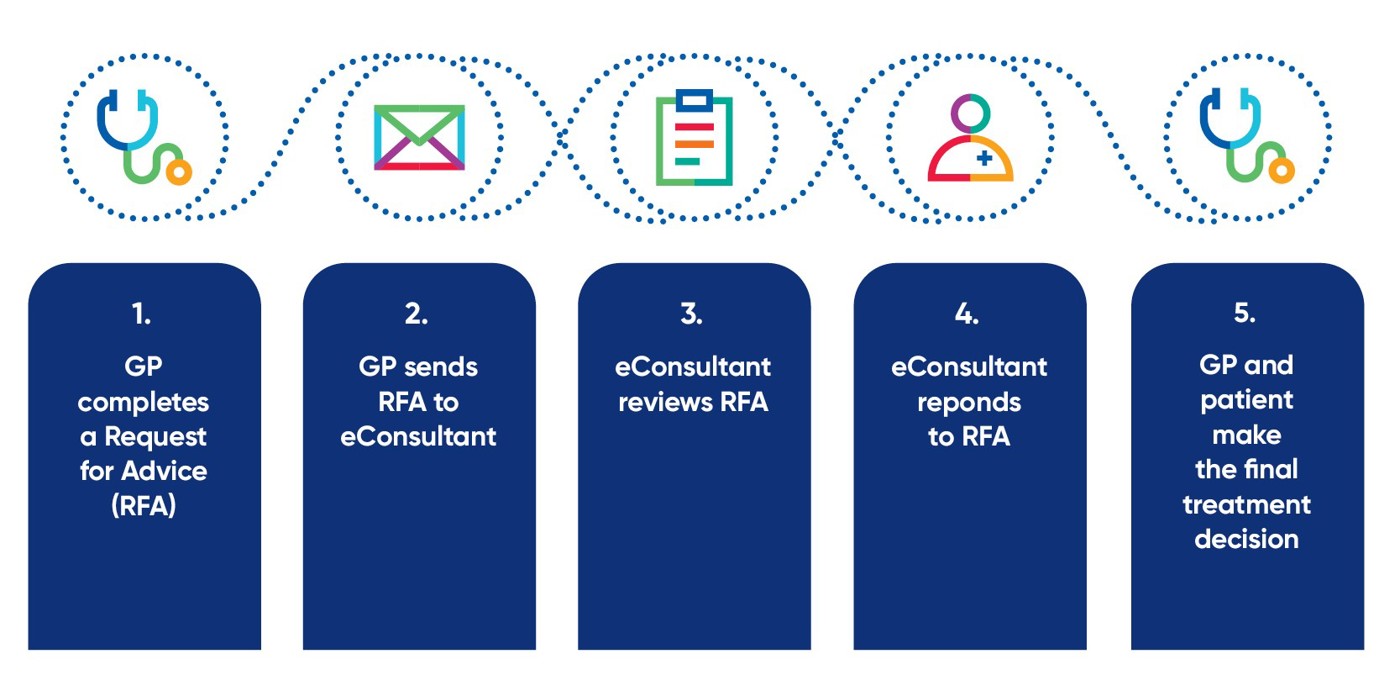
How Mater Queensland eConsultant works
To access the RFA service GPs should follow the following steps:
- Create a Consultmed account (instructions below)
- Click here for full instructions about how to log a RFA
- Ensure that you:
- Complete the clinical assessment by providing relevant medical, psychosocial, family history, current medications, investigations and allergies
- Upload relevant files e.g. pathology, imaging or other correspondence
- Include 1-2 specific questions for the specialist
- Send
- For further instructions, please watch a recent webinar presented by Professor Claire Jackson.
Contact Consultmed for help with setup at consultmed.co/contact/
Tips to get started with Consultmed
- Healthcare providers should create individual Consultmed accounts to comply with data privacy and security standards. Shared email logins cannot be used.
- Practice Managers can create their own Consultmed accounts and invite GPs to join their practice and manage user access. See the Admin Portal Quick Reference Guide to help you with these steps.
- Consultmed integrates with the below Practice Management Systems (PMS):
Best Practice (PMS) | Connect with Consultmed through Halo Connect. Once your Practice Manager has created a Consultmed account and completed the setup, all GPs in your practice can access the platform with integration at the server level. | BP Halo Connect Installation Guide | Best Practice setup video |
MedicalDirector Clinical | Consultmed is available through the sidebar widget. The system is pre-installed and only needs to be set up once by each GP. The widget appears on the right side of your screen and can be pinned so it stays visible whenever you’re working. | MedicalDirector Clinical Installation Guide | MedicalDirector Clinical setup video |
- Not using one of the PMS listed above? You can still create an account and send advice and guidance requests directly through the Consultmed webapp.
Meet our Mater Queensland eConsultant specialists
- Adolescent & Youth Health Medicine – Dr Rebecca Abrahall
- Cardiology - Dr Alex Dashwood
- Dermatology (adult) - Associate Professor Jim Muir
- Dermatology (paediatric) - Dr Asoka Herat
- Endocrinology - Professor David McIntyre and Dr Julian Pavey
- Geriatric Medicine - Dr Paul Varghese
- Haematology - Dr Heshani Mediwake, Dr Naadir Gutta and Dr Jenny Wang
- Immunology - Dr Daman Langguth
- Infectious Diseases - Dr Jill Parkes-Smith
- Nephrology - Dr Vishwas Raghunath
- Neurology -Dr Andrew Swayne and Dr Reuben Beer
- Obstetric Medicine/Medical Complications of Pregnancy - Professor David McIntyre, Dr Jill Parkes-Smith, Dr Julian Pavey and Dr Vishwas Raghunath
- Paediatric & Urology Surgery – Dr Bhavesh Patel
- Respiratory and Sleep Medicine - Dr Olivia Dixon
- Rheumatology - Dr Lisa Cummins & Dr Allison Waung
Are there other specialties that you would use an eConsultant for? You can let us know by completing the GP close out survey when using Queensland eConsultant or email econsultant@mater.org.au

Example cases
Nephrology
GP request for advice: I would appreciate your input and guidance for this gentleman regarding his CKD trajectory in the context of poorly controlled diabetes. It appears his results are stable but there is limited prior information available - just Cr and HbA1cs. His recent results note poorly controlled Hba1cs 85 and Cr of 167(rpt from 178) and stable eGFR 35. His uACR is 30.3
Past medical history - Active Issues: - Type 2 Diabetes Mellitus (8/1/2026) - Dyslipidaemia - Hyperuricaemia - Hypertension (8/1/2026) - Neuropathic pain (8/1/2026) - Chronic Kidney Disease, Stage 3b
Current medications - Gliclazide 60mg Tablet, modified release, 1 Daily - Sitagliptin 100mg Tablet, 1 Daily - Telmisartan /Amlodipine 80mg; 5mg Tablet, 1 Daily - Dapagliflozin \Metformin 10mg;1000mg Extended release tablets, 1 Daily - Pregabalin 75mg Capsule, 1 Twice a day, p.r.n - Ozempic 0.68mg/mL 0.25, 0.5mg/dose Pen device, 1 Once a week
Mater Queensland eConsultant Nephrologist response: Thank you for the request. This 72-year-old gentleman has CKD stage G3bA2 in the setting of an adverse cardiometabolic profile with diabetes mellitus, hypertension and dyslipidaemia. Based on records from 2025, his creatinine was 128umol/l (1.45mg/dL), which is now about 160-170umol/l. The uACR was 30mg/mmol.
In line with the Orange Clinical Action Plan, I would suggest a Kidney Health Check every 3 months (Bloods for creatinine/eGFR, urine for ACR and BP checks) to get an idea of his trajectory. He seems to be optimized with an ARB, SGLT2 inhibitor and a GLP1 receptor agonist for slowing CKD progression, which is great. He will need further optimization to improve diabetic control (despite being on metformin, sulfonylurea and a DDP4 inhibitor), aim for BP < 130/80mmHg and improved lipid control (statin +/- ezetimibe). Based on current goal directed guidelines for nephroprotection, I would suggest adding on finerenone, which has been approved for this indication. His potassium is 5.1mmol/l (aim for K<5.0mmol/l), and suggest also request a PTH to check his bone mineral CKD profile
Haematology
GP request for advice: Thank you for your opinion re leukopenia in a 35-year-old male patient with a long history of mild neutropenia and lymphopenia. Nadir neutrophil count was 1.1. B12, folate, iron studies and LFTs are normal. Current medications do not suggest a cause for leukopenia.
Mater Queensland eConsultant Haematologist response: I would recommend completing screening with ANA, ENA, rheumatoid factor to look for an auto immune cause and do a viral screen with HIV, Hep B and Hep C. Serum ACE is also recommended as sarcoidosis can cause lymphopenia. If the patient is unwell with fevers, a FBC to exclude neutropenia would help. If neutrophils <1.0, the patient should be treated as for febrile neutropenia. Lymphopenia is generally clinically benign as long as HIV is excluded. As long as neutrophils are >1.0, the patient is unlikely to have significant infections and can be monitored.
Paediatric dermatology
GP request for advice: Thank you for your opinion regarding peri-oral hypopigmentation. They are an otherwise well 7 year old who have a 12 month history of stable perioral hypopigmentation which has failed to change with a trial of topical elidel as I felt it may be pityriasis alba. Apart from the appearance the area is asymptomatic. They do have a history of atopy with asthma, allergic rhinitis and previously had lip licking dermatitis years ago.
Mater Queensland eConsultant paediatric dermatologist response: The history and the appearance in this case with consistent with post inflammatory hypopigmentation. Do they continue to lip lick? Sometimes patients are themselves not aware of this habit. Do they use adequate moisture on their face? I would advise them to only use a moisturising soap substitute for skin cleansing and moisturise face twice daily. Post inflammatory hypopigmentation will spontaneously recover when the insult is stopped and with adequate ski care. This may take several months. If any other hypopigmented patches appear at other sites, please resubmit the case.
Cardiology
GP request for advice: 65 yr old male history of EVAR for AAA in 2022, bilateral aortofemoral bypass in Feb 2025 for bilateral arterial thromboses. He has been on maximal dose of Atorvastatin 80mg and Ezetimibe 10mg for greater than 12 weeks and his LDL still remains at 2.0 mmol/L (down from an untreated LDL level of 4.5 mmol/L.) He has not had any cardiac or cerebrovascular events. I was considering if Leqvio/Inclisiran injection may be suitable for him. He seems to fill the pbs criteria for this medication. However this would need to be in conjunction with Specialist Physician. He is other wise fit and well and is attending to appropriate dietary therapy and exercise.
Mater Queensland eConsultant cardiologist response: The patient has symptomatic peripheral vascular disease and is on more than two vascular medications. His LDL cholesterol remains above 1.8 mmol/L despite at least three months of maximal statin therapy plus ezetimibe. He therefore meets the criteria for Inclisiran. This does not require a specialist prescription, as you are able to prescribe it. However, this e-consult serves to confirm specialist agreement, and I am happy for Inclisiran to be commenced. A repeat LDL cholesterol at 3 months, and again at 6 months, would be appropriate. Given his vascular disease, he should also have regular cardiovascular follow-up, as he is a vasculopath.
Geriatrics Webinar
To watch a webinar for GPs using Mater Queensland eConsultant for geriatrics, please click here.
Contact us
For further information, or for help setting up, please contact the Mater Queensland eConsultant team.